Applications
Setup
- Use
/applicationto create job openings that users can apply for. - Click on
Settingsto manage the applications channel, the moderator channel, and limits. - Create a new job opening.
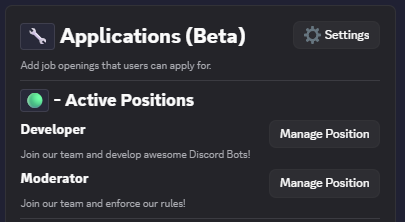
Manage job openings that users can apply for.
Custom Message Design
You can customize the application message using the /messages command.
Questions
When creating a job opening, you can add multiple questions that applicants will have to answer.
Question Types
You can choose from the following question types:
- Short Text: A single-line text input for brief responses.
- Long Text: A multi-line text input for more detailed responses.
- Checkbox: Users can enable or disable this option to answer a question.
- Dropdown: A dropdown menu with custom options for applicants to select from.