TempVoice
Let users create their own customizable voice channels.
🔊 Setup
- Use
/tempvoiceto specify a voice channel as the Join-To-Create channel. - When a user joins the Join-To-Create channel, a new TempChannel will be created for them.
- The channel will be deleted automatically when all users leave.
🎛️ TempVoice Panel
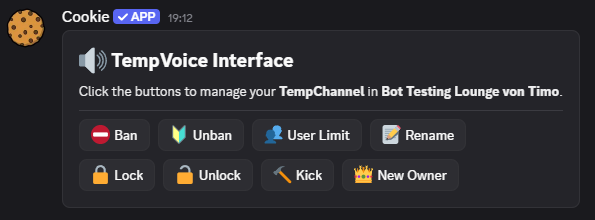
Using /tempvoice, you can create a panel that allows users to manage their channels.
🛡️ Permissions
By default, all permission from the Join-To-Create channel will be inherited to the TempChannels.
🔒 Locking TempChannels
Once a TempChannel has been locked, the join permission for @everyone will be removed.
However, all users that are already in the channel will keep permission to re-join at any time.
👑 New Owner
If the owner of a TempChannel leaves for some time, the member with the longest stay in the channel will become the new owner.